
HomeGPT: AI Interior Design
Fire Elite TeamHouse & Home
4.225.00 Reviews
- Version
- 1.0.8
- Installs
- 50.00K
- Age Rating
- Everyone
Screenshots
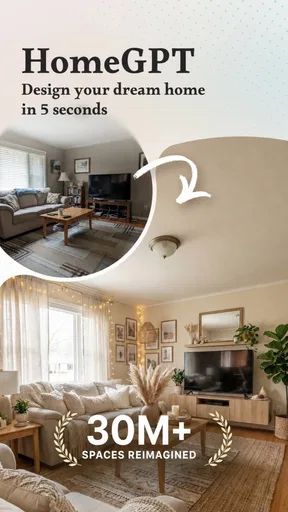
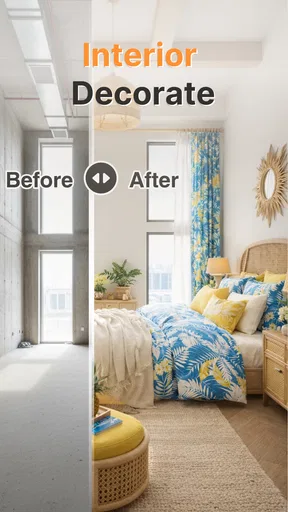
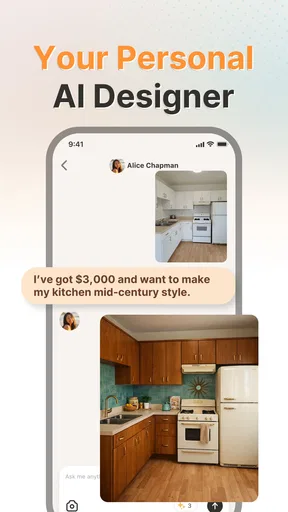
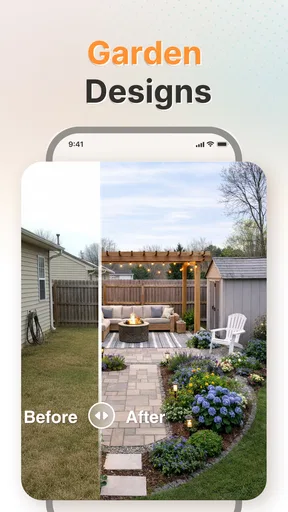
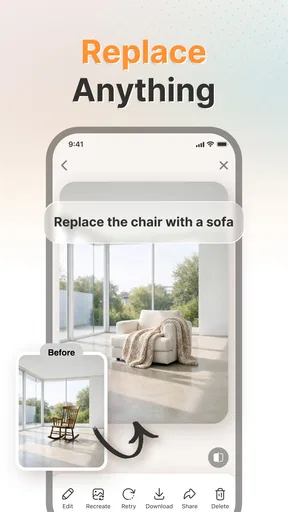
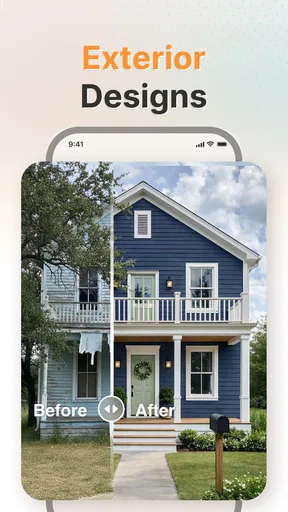
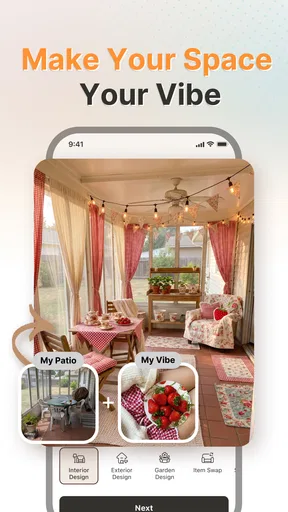
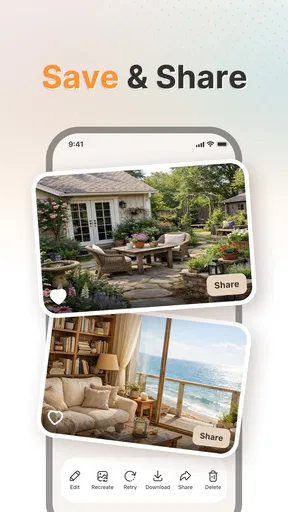
Our Review of HomeGPT: AI Interior Design
 Analysis by Appyee
I approached HomeGPT: AI Interior Design as a quick visual planning tool rather than a full replacement for an interior designer. Its appeal is simple: I can start with a photo of a room, garden, wall, floor, or furniture arrangement and explore a different look without moving anything first. That makes it especially useful when I am stuck between several ideas and need to see a direction before spending money or beginning work.
The app sits in the House & Home category and is made by Fire Elite Team. It is free to install, with optional in-app purchases ranging from $3.99 to $69.99 per item. The age rating is Everyone, and it runs on devices using Android 8.0 or later. Those details make it accessible to casual users, although the purchase range is worth keeping in mind before treating it as an unlimited design workspace.
My overall impression is positive but measured. The strongest part is the speed of visual experimentation. The weakest part is that an AI-generated room image is still an interpretation, not a construction plan, product catalog, or guarantee that the proposed furniture will fit. If I use it for inspiration and compare the result with real measurements, it becomes much more valuable.
Where the first attempts can get stuck
The first point of friction is usually the source photo. A dark image, a cluttered room, or a viewpoint that hides the floor and walls gives the app less visual information to work with. When the room is only partly visible, the result can feel less like a redesign and more like a broad guess. I found that a straightforward photo taken from a standing position is a better starting point than a dramatic angle or a heavily edited picture.
This matters because the request sounds effortless: redesign a space from one photo. In practice, the photo is the foundation of the result. If I photograph a living room while a chair blocks most of the floor, I should not expect the generated version to understand the exact shape of that floor. Likewise, a narrow crop can make it harder to judge how a new arrangement relates to doors, windows, or adjoining areas.
Another common sticking point is expectation. I would not use the app to answer questions such as whether a sofa will pass through a doorway, whether a cabinet can support a television, or whether a wall is suitable for a particular finish. The visual output may suggest an attractive direction, but it does not replace measurements, material checks, or advice from a qualified professional when structural or electrical work is involved.
The same caution applies to furniture. An AI image may show a convincing armchair, table, or storage unit, but that does not mean the exact item exists for sale or that the proportions are accurate. I treat visible objects as design references: rounded seating, light wood, open shelving, warmer flooring, and similar ideas. I then search for real products separately.
Choose the photo for the question you actually have
A useful habit is to decide what I want to learn before taking the picture. If the question is about wall color, I make the walls prominent and keep the lighting reasonably even. If the question is about furniture placement, I include as much of the floor as possible. For a garden, I include boundaries, paths, and the existing planting rather than taking a close-up of one attractive corner.
This small change makes the app more practical. Instead of asking it to “make the room better,” I use the image to investigate one decision at a time. That might be whether a calm neutral palette suits the space, whether a more open arrangement feels appealing, or whether a garden would look better with stronger zones for seating and planting.
I also avoid judging a design from a single result. AI design is useful precisely because it can help me compare directions. One image might be too cold, another too crowded, and a third might reveal a combination I had not considered. The value is in the comparison, not in assuming that the first attractive result is the correct answer.
Setup checks that save time
Before blaming the app for a poor result, I check the basics. I make sure the device meets the minimum operating requirement of Android 8.0 or later, then confirm that the app is updated to its current version, 1.0.8. I also check that the selected photo is available locally and can be opened normally outside the app. A damaged, unusually large, or inaccessible image can create a problem before the design process really begins.
I keep the first test simple. Rather than starting with a complicated renovation photo containing mirrors, glass, several people, pets, and piles of objects, I use one clear room image. That gives me a cleaner way to decide whether the workflow itself is working. Once I understand the result, I can move on to more difficult spaces.
A stable internet connection is another sensible check for an AI-based visual workflow. If an image takes a long time to process or does not appear, I first retry with a reliable connection and avoid repeatedly pressing the same control. Repeated taps can make it unclear whether the app is still working or whether several requests have been started.
I also pay attention to the purchase boundary. Since the app is free but includes optional items priced from $3.99 to $69.99, I would read any confirmation screen carefully before continuing. I would not assume that every style experiment is included without cost. This is particularly important if I am testing the app casually or handing the phone to someone else to try.
The app is suitable for an Everyone audience, but that does not remove the need for ordinary device supervision. I would still explain purchases clearly to children or anyone unfamiliar with app billing. A free installation and optional paid items are two different things, and keeping that distinction clear prevents an avoidable surprise.
A better first session
My preferred setup routine is short. I choose one well-lit image, decide whether I am exploring a room, garden, wall, floor, or furniture idea, and begin with a modest visual change. I avoid trying to settle every design decision at once. If the first output is useful, I then compare a second direction rather than immediately requesting a complete transformation.
This approach also makes it easier to identify what went wrong. If the result is poor after a reasonable photo and a focused request, I can try another image and see whether the issue follows the room or the workflow. If the second image works well, the original photograph was probably the limiting factor.
I keep the original photo untouched and save any useful results separately. That sounds obvious, but it is important when I am using several versions to compare colors, layouts, or levels of decoration. The original is my reference point; without it, a series of AI variations can gradually drift away from the real space.
Recovering when a result is confusing
When a generated design looks wrong, I do not immediately repeat the same action. I first identify the type of error. If the room shape is misunderstood, I take a clearer photo. If the style is close but too busy, I simplify the visual direction. If the furniture appears oversized, I treat that as a warning not to rely on the image for dimensions.
A useful recovery workflow is to change one variable at a time. I might keep the photo and explore a different color mood, then return to the original direction and change the furniture character. Changing the image, the style, and the layout together makes it impossible to know which choice improved or weakened the result.
If processing seems stuck, I wait briefly, check the connection, and try again once rather than tapping repeatedly. If the app closes, I reopen it and begin with the last known good image. I also avoid assuming that an unfinished visual means the room itself is unsuitable. It may simply be a temporary processing or device issue.
For a particularly difficult room, I take two photos from different positions and use them as separate explorations rather than expecting one image to explain everything. This is not a substitute for a measured floor plan, but it can reveal whether a design idea still looks plausible from another viewpoint. If an arrangement only looks good from one angle, I would be cautious about using it in real life.
Turn attractive images into usable decisions
The most valuable step happens after the image is generated. I write down what I actually like about it. Maybe it is the contrast between a pale wall and darker furniture, the way the seating faces a window, or the use of a clear walkway. I then separate those ideas from the exact objects shown.
This prevents a common mistake: trying to copy an AI scene literally. Instead, I can use the result as a brief for shopping or planning. I might search for a compact sofa with similar lines, compare washable flooring options, or test a paint sample against the real wall. The app is strongest at helping me describe a direction that was previously vague.
I also compare the generated suggestion with practical constraints. A visually open room may remove storage that I genuinely need. A minimalist garden may look attractive while offering nowhere to keep tools. A redesigned wall may ignore radiators, switches, sockets, or existing damage. The image starts the conversation; it does not finish the inspection.
For renters, this distinction is even more important. The app can help explore removable decoration, furniture placement, and color inspiration, but I would not treat an image as permission to alter a property. For homeowners planning substantial work, it is a useful mood-board step before discussing options with a contractor or designer.
When the app is not the cause
Sometimes the disappointing result comes from the subject rather than the software. Reflective surfaces, transparent objects, strong shadows, and crowded spaces are difficult for visual systems to interpret consistently. A mirror can make a room appear to contain an extra opening; glass furniture may blend into the background; a dark corner may hide the boundary between floor and wall.
Outdoor images bring their own complications. Gardens change dramatically with weather, season, and lighting. A generated suggestion may look lush or polished without accounting for shade, drainage, local climate, maintenance, or the mature size of plants. I use those outputs to compare layout ideas, not to select species or estimate long-term upkeep.
Color is another area where I stay cautious. The screen on my phone, the lighting in the original image, and the display of the generated result can all affect how a shade appears. A soft beige may look pink in one room and gray in another. I would always test a physical sample before buying paint, flooring, fabric, or large furniture based on an image.
There is also a difference between visual plausibility and physical feasibility. AI can place a desk in front of a window because the composition looks balanced, even if that blocks an opening or leaves no space to sit comfortably. It can suggest a beautiful walkway that is too narrow for everyday use. I check circulation, access, storage, cleaning, and safety separately.
Who benefits most from it
I think the app is a good fit for people who are visually undecided. If I know that my room feels dull but cannot explain whether the problem is color, furniture, lighting, or clutter, seeing several possible directions can help me name the issue. It is also useful for someone preparing a conversation with a decorator, because a visual reference is often clearer than a long description.
It suits small, reversible decisions particularly well. I can explore a new furniture mood before rearranging the room, compare a few wall treatments before buying samples, or imagine a more organized garden before moving planters. These are low-risk uses where inspiration has real value and exact technical accuracy is not the main requirement.
I would skip it as the primary tool for a precise renovation plan. Anyone who needs exact dimensions, verified product availability, construction details, lighting calculations, or a professional drawing will be better served by measurement tools, planning software, or an experienced designer. The app may still help at the mood-board stage, but it should not carry the technical part of the project.
Compared with browsing ordinary home-design photos, this app has the advantage of starting with my own space. Generic inspiration images can be beautiful but often show larger rooms, different windows, and unrealistic levels of tidiness. A redesign based on my photo feels more personally relevant. The trade-off is that a gallery or catalog is better for identifying real products and checking how a known item looks in a controlled setting.
Compared with drawing a room manually, the app is faster for early exploration. Manual planning is better when I need accurate dimensions and repeatable layouts. I see the two approaches as complementary: use the AI image to discover a style, then use measurements and a proper plan to test whether the idea can work.
A realistic everyday workflow
Imagine I am deciding whether to refresh a tired living room before guests arrive. I take a clear photo showing the seating, floor, walls, and main light source. I use the app to explore a lighter, less crowded direction, then compare that with a warmer version using deeper furniture tones. I do not buy anything yet. Instead, I note which parts consistently appeal to me across the alternatives.
Next, I measure the wall, the available walkway, and the space around the existing furniture. If the suggested arrangement would make the path awkward, I keep the color and atmosphere but reject the layout. I then look for real items that match the visual character, checking their dimensions, care requirements, and return conditions independently.
This workflow shows where HomeGPT earns its place. It shortens the distance between “I want a change” and “I can describe the change.” It does not remove the practical work, but it can make that work more focused. I am no longer searching randomly; I have a clearer idea of the mood, contrast, and level of decoration I want.
The same method works for a garden. I can explore whether I prefer a structured arrangement or a softer, more informal one, then check sunlight, drainage, access, and maintenance before acting. The image is a conversation starter with myself, my household, or a professional—not a promise about how the finished space will behave.
My practical verdict after using it
HomeGPT: AI Interior Design is most convincing when I treat it as a fast visual thinking tool. Its free entry point makes experimentation easy, and its focus on redesigning a personal photo is more useful to me than endlessly scrolling through unrelated interiors. The current release is version 1.0.8, and the app has reached over 10 thousand installs with a 4.5 average from 139 ratings, which suggests a modest but encouraging user base.
I appreciate that it can cover more than a single room style. I can use it for walls, floors, furniture, gardens, and broader room changes, which gives the app a wider role in early home planning. The best results come when I provide a clear image, ask a focused visual question, and compare ideas instead of expecting one perfect answer.
The limitations are important. Generated proportions may be unreliable, objects may not correspond to real products, and complex or poorly photographed spaces can produce distracting results. The optional purchase range also means I would pay attention during the workflow rather than assuming every experiment is included. For technical remodeling, accurate planning, or purchase decisions that depend on exact fit, I would choose a more specialized solution.
My recommendation is to use it before the measuring and shopping stage, not instead of them. If you want help finding a style, explaining a vague decorating idea, or seeing how your own space might feel with a different direction, it is worth trying. If you need a dependable blueprint or a guarantee that a design will work physically, look elsewhere and use this app only as supporting inspiration.
In short, I would recommend it to a friend who is stuck at the beginning of a home project. I would tell them to take a clean photo, change one idea at a time, save the original, and verify every practical detail outside the image. Used that way, HomeGPT turns uncertainty into a set of visual options without pretending that an attractive picture is the same thing as a finished plan.
Privacy and Permissions
See what permissions an app requests and how it handles your data.
- Photos/Media/Files
- read the contents of your USB storage, modify or delete the contents of your USB storage
- Storage
- read the contents of your USB storage, modify or delete the contents of your USB storage
- Camera
- take pictures and videos
- Microphone
- record audio
- Wi-Fi connection information
- view Wi-Fi connections
- Other
- view network connections, full network access, control vibration, prevent device from sleeping
Verdict
Strengths of HomeGPT: AI Interior Design
- Generates quick room design ideas from uploaded photos.
- Offers multiple interior styles for different tastes.
- Useful for visualizing renovations before buying furniture.
- Simple interface suitable for users without design experience.
- Can inspire color palettes, layouts, and decorative details.
Limitations of HomeGPT: AI Interior Design
- AI results may distort room proportions or architectural features.
- Some advanced designs may require a paid subscription.
- Generated furniture may be unavailable or difficult to identify.
- Results can look generic without detailed prompts or clear photos.
- Uploading room images may raise privacy concerns for some users.
Other Releases by Fire Elite Team
View All
Vlog AI: Photo to Video
Art & Design3.9
Similar Picks in This Category
View All
Universal TV Remote Control
CodeMatics Media Solutions3.9

AlfredCamera Home Security app
Alfred Systems Inc.4.7

Planner 5D: AI Home Design
Planner 5D4.5

Universal Tv Remote-Cast to TV
One Music Player4.1

Zillow: Homes for Sale & Rent
Zillow Group4.8

99acres Buy/Rent/Sell Property
infoedge.com4.3
Frequently Asked Questions
What is HomeGPT: AI Interior Design and how does it work?
HomeGPT: AI Interior Design is an AI-powered decorating tool that helps you visualize ideas for rooms and living spaces. You typically upload or provide an image of a room, choose a preferred interior style, and let the app generate design suggestions. The results can help you explore layouts, colors, furniture, and decorative concepts before making real changes at home.
Can HomeGPT redesign a photo of my existing room?
Yes, the app is mainly useful for transforming an image of an existing space into different design concepts. For the best results, use a clear, well-lit photo with the room fully visible and as little obstruction as possible. Keep in mind that AI-generated designs are visual suggestions rather than exact renovation plans, so furniture dimensions, structural details, and final placement should be checked separately.
Does HomeGPT: AI Interior Design offer different decorating styles?
HomeGPT is designed to let users experiment with multiple interior design directions, such as modern, minimalist, Scandinavian, classic, or other style variations available in the current app version. Style names and available options may change after updates. The generated images can be useful for comparing moods and color palettes, although the consistency and accuracy of each result may vary depending on the original photo.
Is HomeGPT: AI Interior Design free to use?
The app may provide free features or a limited number of design generations, while additional tools, higher usage limits, premium styles, or faster processing can require in-app purchases or a subscription. Before downloading or starting a trial, review the pricing page carefully, including renewal terms. App Store and Google Play prices can also differ depending on your country and platform.
Should I rely on HomeGPT for professional renovation or interior design decisions?
HomeGPT can be a convenient source of inspiration, but it should not replace an architect, interior designer, contractor, or other qualified professional. AI images may show attractive ideas while overlooking electrical work, plumbing, building regulations, structural limitations, accurate measurements, or realistic product availability. Use the results as a starting point, then confirm feasibility, costs, and safety before beginning a renovation.
